Classic Drum: play drums
- 4.6
- Rating
- 10.00M
- Installs
- Free
- Price

 Analysis by App-foxy
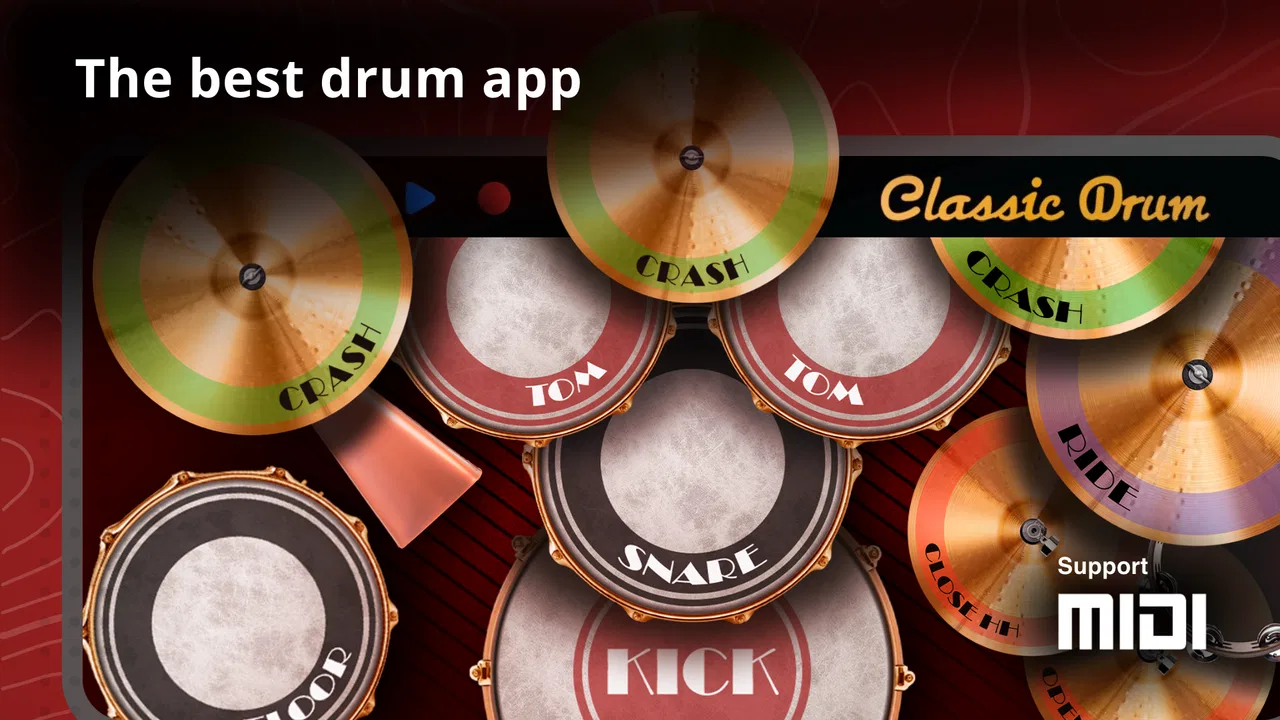
I picked up Classic Drum: play drums expecting a simple virtual drum kit, and that is exactly where it makes sense: it turns an Android device into a quick, touch-based way to tap out rhythms. I found it most useful when I wanted to experiment without setting up a physical kit, make a beat while waiting, or let someone try basic drum patterns without handing over a complicated music workstation.
This is a free music game from Kolb Apps, aimed at Everyone, and it has been around since May 14, 2012. Its long presence and broad audience are reflected in an average rating of 4.6 from roughly 123,000 ratings, with more than 10 million installs. Those figures do not automatically make it perfect, but they do match my impression of an accessible app that people can open quickly and understand without a lesson first.
How it works when a household shares one device
The strongest household use case is informal and immediate. Imagine a tablet or phone sitting on a kitchen table while one person is waiting for dinner, another is taking a break from homework, and someone else wants to copy a rhythm heard in a song. Classic Drum fits that moment better than a full music-production app because the central action is direct: touch the virtual drums and listen to the result.
You May Also Like

 Blood Strike: 2.5 Anniversary
Blood Strike’s Loadouts Turn Every Drop Into a Tactical Gamble
A close look at Blood Strike’s custom loadouts: how fast access to signature weapons reshapes its battle royale rhythm, rewards preparation, and narrows the gap between fights.

 Pandora - Music & Podcasts
Pandora’s Music Is Easy to Start, but Harder to Recover
Pandora’s strength is its low-effort path from a seed to a station. Its weak spot is how much confidence it asks you to place in connection, setup, and quiet recovery.

 8 Ball Pool
 Is Built on Rivalries, Rematches, and Routine
A close look at the rivalries, rematches, shared routines, and unanswered safety questions that turn a quick pool match into a persistent mobile community.

 Samsung Music
’s Quiet Strength Is Playing What You Already Own
Its reach comes less from spectacle than from dependable access to a personal library. That simplicity is both the app’s strongest retention engine and its ceiling.

 AccuWeather: Weather Radar
AccuWeather Review: A Quick, Clear Forecast for Everyday Decisions
For everyday plans, the best forecast is the one you can understand quickly. AccuWeather makes rain timing, radar, and local conditions easy to act on, with a few trade-offs.

 Hill Climb Racing
Why Hill Climb Racing Still Turns Crashes Into One More Run
A tiny car, a bumpy hill and one more upgrade: Hill Climb Racing keeps resurfacing because its simple chaos makes every near-miss feel personal.
More From Our News Desk



I like that this kind of setup removes the intimidation of a real drum kit. A beginner does not need to know how to position hardware, tune anything, or understand a recording interface before making a sound. A child can explore the relationship between hitting different parts of a kit and hearing different drum tones, while an adult can use the same basic layout to test a rhythm idea.
That simplicity also makes the app suitable for short turns rather than long shared sessions. On a common device, I would treat it as a pass-the-phone activity: one person creates a pattern, the next tries to repeat it, and the group decides which version feels steadier. It is a small but useful way to practice listening and timing without turning the room into a rehearsal space.
The trade-off is that a shared screen can become crowded quickly. Several people tapping at once makes it harder to see who is doing what, and a phone-sized display gives each virtual pad less room than a physical instrument. For coordinated play, I would use one player at a time and keep the device on a stable surface. That makes the experience calmer and reduces accidental taps.
What the first few minutes feel like
My first few minutes were about learning the touch response rather than searching through menus. The basic appeal is immediate: tap a drum area, hear the sound, and adjust your hand position. That direct feedback is more inviting than an app that starts with account creation, project folders, or a long tutorial.
For a beginner, I recommend starting with a simple repeating pulse. Use one hand to keep the beat and add another sound only after the rhythm feels consistent. This is more productive than tapping every visible area at random, because it teaches coordination and makes the difference between a steady groove and a noisy sequence obvious.
For a child using the app, I would demonstrate a short pattern first and then ask them to copy it. That turns free play into a listening exercise without pretending the app is a complete music course. It also gives the shared device a clear routine: listen, try, stop, and hand it to the next person.
Setting expectations before handing over the device
Classic Drum is free to download, which lowers the barrier for a casual trial. It includes in-app purchases ranging from $0.99 to $18.99 per item, so I would still check the device’s purchase settings before letting a child explore alone. That is not a criticism of the drum experience itself; it is simply sensible housekeeping whenever a free app offers optional paid items.
I would also decide in advance whether the device is being used for quiet experimentation or for a louder group activity. Virtual drums can be surprisingly attention-grabbing in a shared room, and repeated tapping may annoy people nearby. Headphones can help when appropriate, although the best choice depends on the child’s age and the household’s normal rules for audio use.
Because this is a game in the music category rather than a full private lesson environment, I would not present it as a substitute for a teacher or a real practice kit. It can introduce rhythm, encourage curiosity, and provide a convenient surface for trying ideas. It is less suitable if the goal is structured instruction, detailed technique correction, or a complete song-production workflow.
Coordination, timing, and practical rhythm habits
The most valuable thing I found was not the novelty of seeing drums on a screen. It was the way the app exposes timing mistakes immediately. When I rushed, the pattern sounded crowded. When I hesitated, the groove broke apart. That makes the app useful for short coordination drills, especially for someone who wants to understand rhythm through action rather than theory.
A practical routine is to choose one repeating beat and keep it going for a while before adding variations. On a shared device, one person can maintain the basic pulse while another adds occasional accents, then they can swap roles. This creates a small coordination challenge without requiring multiple instruments or a formal game mode.
Another useful approach is “copy and change.” One player taps a short pattern, the next repeats it, and then changes only one hit. The first player tries to identify what changed. This works well with siblings or friends because it feels like a game, but it also trains attention to placement and sound.
I would avoid judging success by how fast someone can tap. Speed is easy to mistake for skill, particularly on a touchscreen. A slower, even pattern is more useful for beginners than a frantic burst. The app makes that distinction audible, which is one reason I think it works better as a casual rhythm tool than as a purely visual toy.
Why touch drums are convenient, and where they fall short
A physical practice pad or electronic drum kit will give a more convincing sense of movement, rebound, and limb independence. A desktop music program will usually offer deeper sequencing, editing, and arrangement options. Classic Drum wins on convenience: the device is already in your hand, the interaction is understandable, and a quick experiment does not require a studio-like setup.
That convenience comes with limits. Touching a screen does not reproduce the physical response of a drumhead, and the visual size of a phone can restrict comfortable two-handed playing. If you are seriously studying drumming technique, you will eventually need something that teaches posture, stick control, dynamics, and coordination beyond screen taps.
I also would not choose it as my main tool for producing a polished track. Its appeal is the immediate act of playing, not the depth of a full recording environment. Someone who wants layered instruments, detailed editing, or a carefully arranged composition may be happier with a dedicated music workstation. Someone who wants to test a beat during a spare minute may prefer this precisely because it avoids that complexity.
Shared-device boundaries that actually help
On a family phone or tablet, I would establish a few simple boundaries rather than inventing a complicated system around the app. Give each person a short turn, keep the volume agreed in advance, and return the device to the same place afterward. These rules matter more than a long explanation because the app is easy to open and easy to pass around.
I would also avoid assuming that every player has the same comfort level. A young child may enjoy tapping every drum immediately, while an older beginner may want a quieter chance to repeat a pattern. Letting each person choose between free exploration and a short copying exercise keeps the activity from becoming a competition.
If several people want to play at once, use spoken roles: one person keeps the pulse, one adds accents, and one listens. Since everyone is interacting with one screen, clear coordination is more realistic than trying to imitate a full band. This small structure is one of the better ways to turn a basic app into a cooperative household activity.
Age, trust, and who should use it
The Everyone content rating makes sense for the core idea of tapping virtual drums, and I can see why the app appeals across age groups. It does not require a child to understand music vocabulary before starting. An adult can enjoy the same immediacy, especially when looking for a quick rhythm outlet rather than a serious practice session.
Still, an age label should not replace normal supervision on a shared device. The important household question is not only whether the drum activity is appropriate; it is also whether the person using the device understands the family’s rules about purchases, volume, and handing over the phone. Since optional purchases are available, I would make those expectations clear before a child begins exploring.
I would trust it most in a guided setting: a parent showing a child a simple beat, siblings taking turns, or a beginner using it while an adult helps distinguish steady timing from random tapping. I would be more cautious about presenting it as an unsupervised educational tool. It can support learning, but it does not replace an adult’s judgment about attention span, noise, or device access.
For adults, the app is a good fit if you want a low-pressure way to reconnect with rhythm. You might use it to sketch a beat before searching for a more advanced tool, to entertain a guest who likes music, or to fill a few idle minutes with something more active than scrolling. I would skip it if you need realistic hardware response or a serious recording workflow from the same app.
For children, I see the best value in short, purposeful sessions. Ask them to repeat a pattern, change one sound, and explain what they hear. That turns tapping into a basic lesson in memory and timing. Without that structure, the experience can become repetitive quickly, particularly for a child who expects levels, characters, or a larger game system.
How it compares with the usual alternatives
Compared with a physical drum kit, Classic Drum is quieter, cheaper to try, and far easier to store. It is also less expressive and less useful for developing real playing technique. Compared with a practice pad, it offers more immediate sound variety but less physical feedback. Compared with a full music-making app, it is faster to understand but much narrower in purpose.
That middle position is important. This is not the choice I would make for a drummer preparing for a performance, and it is not the best option for someone who wants to build a complete song from multiple tracks. I would choose it for accessibility: a curious beginner, a family looking for a quick music activity, or an adult who wants to test a rhythm without committing to equipment.
The app’s current version is 8.50.17, and it supports devices running Android 7.0 or later. That makes checking the operating system worthwhile before planning a shared-device activity, especially if the household keeps an older phone or tablet for children. Once compatibility is settled, the free entry point makes trying it a relatively low-risk decision.
Small habits that make the experience better
Keep the device flat or supported rather than holding it in one hand while playing with the other. A stable position makes repeated taps more consistent and gives a second person a clearer view. On a phone, I would also use shorter patterns because the limited surface makes wide, fast movements tiring.
Start with one sound, then add another, instead of trying to use the whole kit immediately. This reveals whether the timing is actually stable. If a pattern falls apart after adding a second part, simplify it again. That workflow is more revealing than chasing speed and is especially helpful when a parent is guiding a child.
For shared use, agree on a stopping signal. A simple count-in or spoken “finish” prevents one player from continuing while another is trying to take a turn. It sounds minor, but clear transitions make a touchscreen activity feel much more organized and reduce arguments over who is playing next.
If the app inspires a serious interest in drumming, treat that as a useful starting point rather than proof that the app is enough. Move toward lessons, a practice pad, or electronic hardware when the player wants physical technique and sustained practice. The virtual kit is valuable precisely because it can reveal that interest before a household spends more money.
My household verdict
I enjoyed Classic Drum most when I stopped expecting a full drum simulator and used it as a compact rhythm playground. It is quick to understand, easy to share in short turns, and approachable for people who have never touched a drum kit. The free price makes it practical for trying, while the optional purchases mean I would still keep ordinary device safeguards in place.
Kolb Apps has made something that works particularly well in the gaps between more demanding activities. A child can copy a beat with a parent, siblings can challenge each other to remember a pattern, and an adult can test a musical idea without setting up equipment. Those are modest uses, but they are realistic and repeatable.
My recommendation is strongest for casual learners, families, and rhythm-curious users who value immediate interaction over depth. I would not recommend relying on it for formal drum training, realistic performance practice, or advanced music production. In those situations, physical hardware or a broader music app will serve you better.
For a shared Android device, though, the balance is appealing: a familiar screen becomes a small instrument, the activity can be guided without complicated preparation, and the age rating suits a broad audience. If you want a simple way to make rhythm part of an everyday household moment, this is a worthwhile free download.
FAQs for Classic Drum: play drums
01What is Classic Drum: play drums?
Classic Drum: play drums is a mobile application designed for both Android and iOS devices that simulates a real drum kit. It provides users with an interactive and engaging experience by allowing them to play a variety of drum sounds directly on their smartphone or tablet. The app includes multiple drum kits, customizable layouts, and a range of songs to practice with.
02Is Classic Drum suitable for beginners?
Yes, Classic Drum is highly suitable for beginners. The app offers a user-friendly interface that makes it easy to navigate. It includes tutorials and practice modes that help new users learn the basics of drumming. Additionally, users can adjust the speed of songs to match their skill level, making it a great tool for learning and improving.
03Can I customize the drum kits in Classic Drum?
Absolutely! Classic Drum allows users to customize their drum kits to suit their preferences. You can choose from various drum sounds and layouts, allowing you to create a personalized drumming experience. This feature is perfect for users who want to experiment with different styles and sounds, enhancing their creativity and enjoyment.
04Does Classic Drum require an internet connection?
No, Classic Drum does not require an internet connection to function. Once downloaded, users can access all the features and practice their drumming skills offline. This makes it a convenient option for those who want to use the app on the go or in areas with limited connectivity.
05Is Classic Drum free to download and use?
Classic Drum is free to download, offering a range of basic features at no cost. However, it also provides in-app purchases for additional drum kits and features. These optional purchases can enhance the user experience, but the free version is quite comprehensive for those who want to enjoy drumming without spending money.
Pros
- Easy to use with intuitive controls.
- High-quality sound samples.
- Customizable drum kits.
- Free with optional in-app purchases.
- Works offline without issues.
Cons
- Limited free features available.
- Ads can be intrusive at times.
- May lag on older devices.
- No option for recording sessions.
- Limited tutorial content for beginners.

Classic Drum: play drums
Gallery